a-text-logo0.png
Advanced Workflow
You can edit any workflows you have selected or create a workflow from scratch in the Advanced Workflow. There are numerous Automation Objects available to enhance workflows and hovering over each automation option will give you a description as to its use within a campaign.

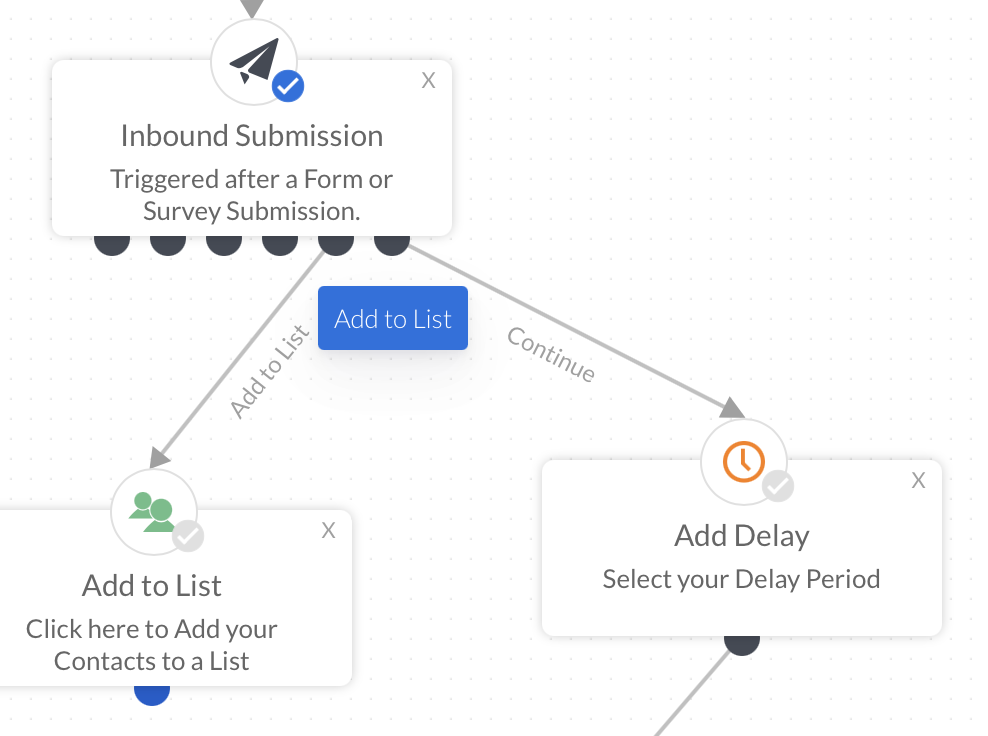
Hovering over the nodes of the automation objects you have selected will help guide you as to what automation objects you can connect them to.
Note: A single click and release on one node will spawn a dotted line. A second click and release on the node you wish to connect it to will join the automation objects. 
Screenshot2021-11-15at18.45.14.png
Communication

Campaign Triggers
The start point of a campaign.
Email Contacts
Paired with the automation object Send Email, this is where email addresses and/or Static List names for the contacts you want to send the campaign to. Learn more about Email Campaigns.

Mobile Contacts
Enter the mobile numbers for the contacts you want to send the campaign to. Learn more about SMS Campaigns.

SMS
Enter your SMS content - maximum 160 characters.

Mobile Forms
Enter the registered devices to publish the campaign. Learn more about Mobile Form Campaigns.

Website 
The website integration code that starts a campaign. Learn more about Website Campaigns.

Short Link
Generate a short link to a form or survey that can be used in many different communication channels. Learn more about Short Link Campaigns.

Social Media
Create and post to individual or multiple social media platforms including Facebook, X, Linked In and Instagram.  Learn more about Social Media Campaigns. 


Other Communication Objects

Send Email
Select a email template to send in the campaign.

Email Form
Select a form template for use in the email campaign.

Email Survey
Select a survey template for use in the email campaign.

Form
Select a form template for use in a social media, website, or SMS campaign.

Survey
Select a form template for use in a social media, website, or SMS campaign.

Device Survey
Select your form template for use in a device campaign (iPad or iPhone). 

Triggers

Objects that will act as a trigger to the next part of the workflow after an interaction e.g. Inbound Submission (form/survey), Link Clicked.
Check Email Status
Check the status of an email - if it has been read or not, if  the contact unsubscribed or hard bounced.

Inbound Submission
Upon the submission of a form or survey, trigger next steps such as add contacts to a list or redirect to a URL.

Emotional Analytics
Emotional rate the content of raw text submitted in a form or survey.

Link Clicked
Report on if a link contained in an email is clicked and trigger next steps.

Event Attendee
Detect if the contact has attended or registered for an event.

Web Page Visited
Trigger a workflow based on a web page visit by a known contact. 

CSAT Change
Trigger an email when the CSAT of a contact changes. 

NPS Change
Trigger an email when the NPS of a contact changes. Send dependant on if the NPS has been recorded as a Promoter, Detractor or Passive respondent. 

Add Delay
Add a time delay in between automation objects.

Retry
Retry the previous action e.g. retry if the email has not been opened.

Added to List
Trigger a campaign when a contact is added to a static list.
Actions

As a result of a Trigger, an Action will move the contact to the next step in the workflow e.g. Create Opportunity, Redirect to URL.
Email Alerts
Send an email alert to a User of the platform to login and view the 

Funnel Marker
Mark a point in the contact journey that records against the contact for future reporting.

AB Test
AB Test form, survey or email content.

Redirect to URL
Redirect a contact after a form or survey submission to a URL of your choice e.g. a website landing page.

Trigger Web hook
Trigger a web hook after a form or survey is submitted.

Add Contact to Campaign
Add a contact to another campaign automatically.

Add to List
Add a contact to a list upon form or survey submission

Remove from List
Remove you contact to a list upon form or survey submission

Create Opportunity
Create a new opportunity in the platform upon a contact submitting a form or survey.

Create Task
Create a task in the platform 

Contact Score
Increase or decrease a contact score. 

Submission Status
Add status options to the submission of a form or survey.
Integrations

Integrate with a separate solution at some point within the workflow e.g. create a lead, add a contact to keep both solutions in sync.

Learn more about Email Campaign Reporting.